Privacy Settings
Under Settings → Privacy you provide the legal details about your
organization needed for a GDPR-compliant legal notice and consent
documentation. This page is separate from Branding — it's
about legal requirements, not appearance.
Required field status
At the top, a progress bar shows live how many required fields have been filled in. Missing fields are marked with a ✗ while empty — once all required fields are filled, a green "Complete" badge appears. The dashboard warning banner (see Dashboard & Statistics) only disappears once this list is complete.
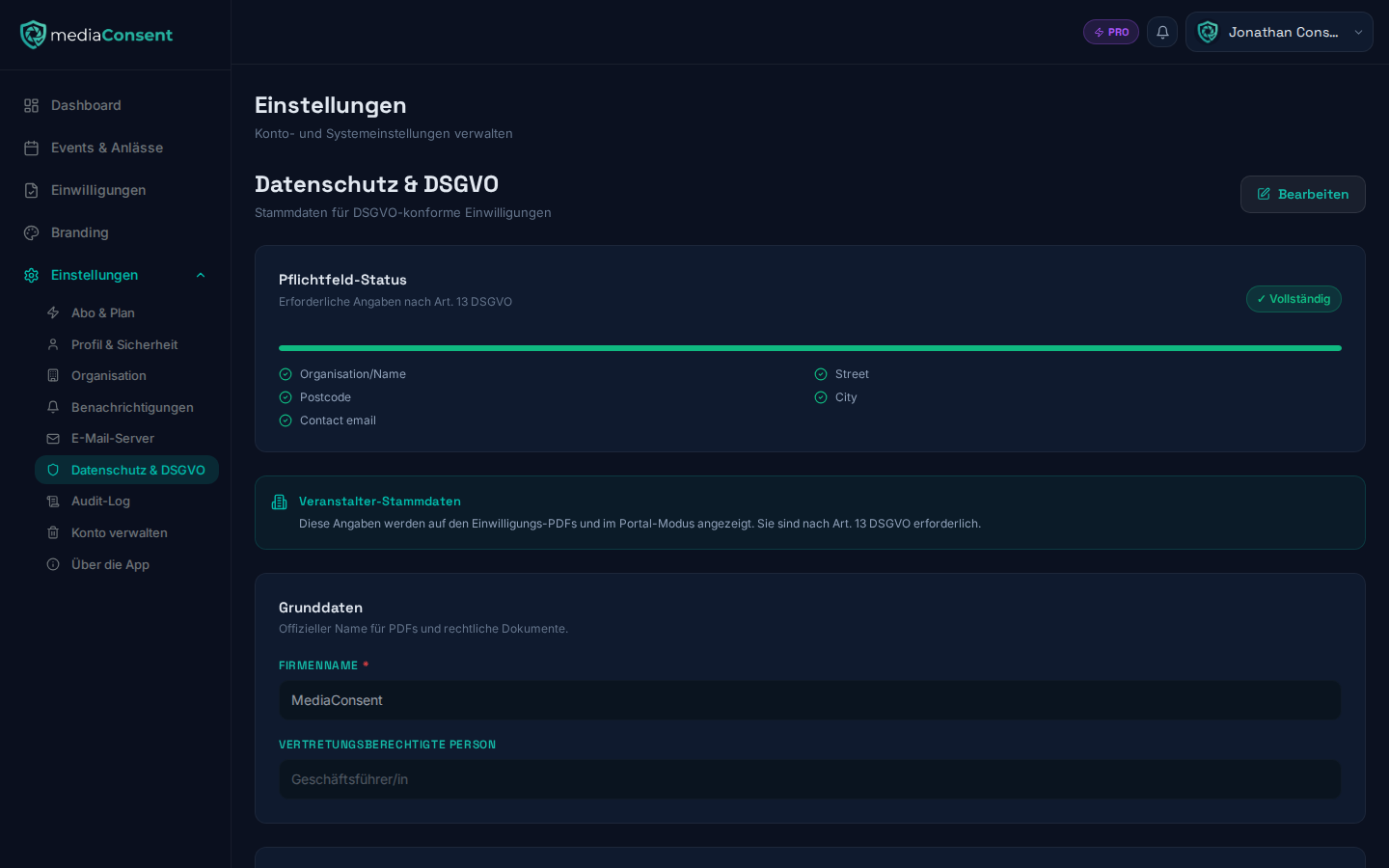
:::warning Also blocks creating events As long as required fields are incomplete, you can not only not activate your event — creating new events and duplicating existing ones is blocked too. It's best to fill in this page right at the start. :::
Right after your first sign-in, mediaConsent already asks you for the most important details (name, address, contact email) in a short dialog — you can skip it ("Later") and complete the details here at any time.
Basic information
Depending on your account type (company or individual), mediaConsent asks for your company name or your personal name. Company accounts also get an additional authorized representative field.
:::warning Synced with the Organization page The company name is automatically kept in sync with the display name under Settings → Organization when you save — a change on either page affects both. :::
Address
Street, ZIP code, and city are required fields; country defaults to Germany and is editable.
Contact
Contact email (required), phone (optional), and, for company accounts, website.
Data protection officer (company accounts only)
If your organization is legally required to appoint a data protection officer, enable the corresponding toggle and enter their name and contact email (required once enabled).
Privacy policy
Enter the URL to your public privacy policy, which is linked in the kiosk portal.
Retention periods
Choose how long consent data is retained before it's automatically anonymized: 1, 2, 3 (default), 5, 7, or 10 years. For details on automatic anonymization, see Manage Consents.
The same section has the "Automatically process deletion requests" toggle (default: off). If someone requests deletion of a consent through the self-service page and you don't respond within 30 days, enabling this toggle causes it to be anonymized automatically. Without enabling it, a deletion request stays open until you manually confirm or decline it — see Deletion Requests.
GDPR compliance
An info box summarizes which GDPR articles mediaConsent covers for you technically (lawfulness of processing, provability of consent, right to erasure, right to data portability). A more detailed breakdown, wired up to your account, is available under GDPR Overview.