Participant Self-Service (Art. 15 GDPR)
At /my-data (German alias: /meine-daten, same content), every
participant has access to a public self-service page. It's not linked from
anywhere else yet, but it's directly reachable via the URL.
:::info Platform-wide, not limited to your account The self-service page shows a person all their consents and objections across every organizer using mediaConsent — not just the ones from your account. :::
Flow for the participant
-
The person enters their email address at
/my-dataand requests an access link.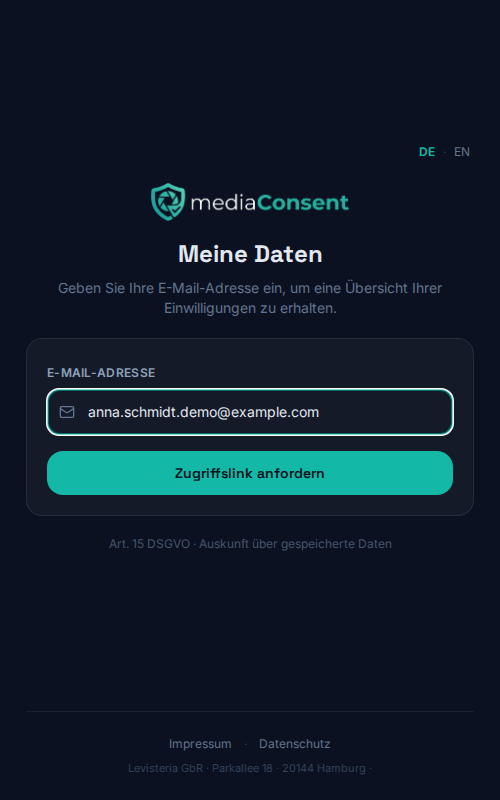
-
If consents or objections exist for that address, they receive an email with an access link valid for 48 hours. To prevent the request from being abused to guess other people's email addresses, the page always shows the same success message regardless of whether a match exists.
-
Via the link, the person sees an overview of all their entries, each showing:
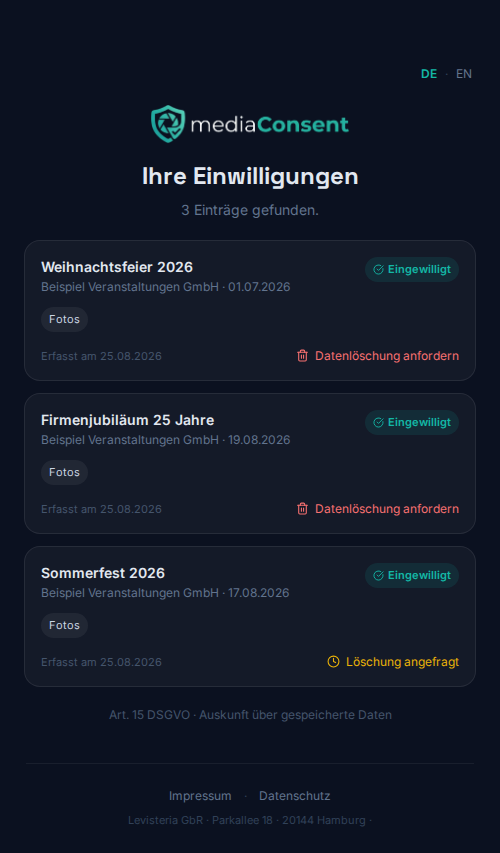
- event name, organizer name, and event date
- status: Consented, Objected, or Revoked
- the granted usage options
- a download link to the confirmation PDF (if available)
- for an existing, non-revoked consent: a link to the existing revocation flow
- a "Request data deletion" button — see Deletion Requests
Own branding for the notification email
Since a self-service request can involve several organizers at once, mediaConsent deliberately sends the access-link email in its own mediaConsent branding rather than a single account's branding.
What you notice as an organizer
Nothing changes in your day-to-day workflow directly — the self-service page is an additional, direct way for participants to exercise their right of access under Art. 15 GDPR without needing to contact you. If someone requests a deletion through it, that request shows up as a new entry in your admin area — see Deletion Requests.